Ergonomic Keyboard Height Calculator
Based on ANSUR II anthropometric data

Sitting Desk
—
Floor to Desk Top
Standing Desk
—
Floor to Desk Top
Seat Height
—
Floor to Seat Pan
What Is The Ideal Keyboard Height
The correct height places the top of the keyboard at or slightly below elbow height when sitting or standing with relaxed shoulders. Your elbows should naturally bend between 90 and 110 degrees, the range our calculator targets.
This window is explicitly advised by the Canadian Centre for Occupational Health and Safety, and falls within the broader ranges recommended by OSHA (90 to 120 degrees) and ANSI/HFES 100-2007 (70 to 135 degrees).
Using elbow height as the reference keeps your arms in a natural, low-strain position and distributes muscle load evenly.
Why Keyboard Thickness Matters
In traditional office ergonomics, the primary contact point was paper, and the work surface was synonymous with the desktop.
Modern input devices add height above the desk. Ergonomic calculators should account for that by considering keyboard and mouse elevation when estimating the proper desk height.
The Cost of “Zero Subtraction”
When keyboard thickness is ignored and desk height is set equal to elbow height, the desk height for typing can end up slightly too high. While this may still fall within an acceptable postural range, it increases the likelihood of compensatory wrist or shoulder postures during sustained use.
For this reason:
Desk Height ≥ Elbow Height − Keyboard Thickness
Wrist Extension Pressure
When the home row of the keyboard is higher than elbow level, a common compensation is bending the wrists backward to clear the front edge of the keyboard.
Even moderate wrist extension significantly increases pressure within the carpal tunnel. Over time, sustained increases in pressure and reduced blood flow can contribute to tingling, numbness, and discomfort in the hands.

Static Shoulder Loading
Another common compensation occurs when the hands rest on the desk, but the elbows move outward to reach a keyboard that is too high. This creates a triangular arm posture, requiring sustained shoulder abduction.
Even with the hands supported, holding the arms away from the body increases static loading of the shoulder and neck muscles. Over time, this continuous activation is associated with shoulder discomfort, neck tension, and an increased risk of tension-type headaches.
📝 Methodology
This calculator relies on data from the U.S. Army Anthropometric Survey (ANSUR II) to estimate your unique proportions based on your height and gender.
By applying linear regression equations to your specific inputs, the algorithm calculates key anatomical landmarks. These include your popliteal height (the distance from the floor to your knee crease) and your elbow height in both seated and standing positions. This creates a highly personalized, biomechanically sound target for your chair, and desk height for typing.
Formulas Used (h = height in cm)
| Measurement | Male Formula | Female Formula |
| Chair Height | 0.24h + 3.9 | 0.235h + 3.0 |
| Seated Elbow Height | 11.63 + 0.0733h | 15.57 + 0.0471h |
| Standing Elbow Height | 0.625h + 1.6 | 0.63h + 1.2 |
The Desk & Keyboard Range
Instead of providing a single strict desk height, the tool outputs a dynamic range. This ensures it allows for a comfortable typing position with an elbow bend between 90 and 110 degrees, which aligns within OSHA, ANSI/HFES 100-2007 and and ISO 9241-5 guidelines.
Top Bound (90°): The calculator takes your elbow height and subtracts the exact thickness of your keyboard. This prevents your hands from angling upward and protects against carpal tunnel pressure.
Bottom Bound (110°): Using biomechanical trigonometry, the algorithm estimates the length of your forearm (roughly 15 percent of your total height). It then calculates the vertical drop required to open your elbow angle by exactly 20 degrees.
How To Achieve Proper Keyboard Ergonomics
After calculating your optimal keyboard height, use these steps to set up your workspace.
Step 1: Chair
This is the ergonomic foundation. It directly affects your elbow height and correct keyboard height.
The calculator recommends a chair height based on your popliteal height (floor to back of knee), plus 3 to 4 centimeters to account for seat compression and hips. Small adjustments are normal and expected. If you prefer a different chair height, measure and enter it as a custom value in the calculator.
Make sure that:
Step 2: Adjust Keyboard Height
Measure up to the recommended keyboard height range and adjust your desk or tray accordingly. Start in the middle and fine-tune until typing feels most comfortable. Your keyboard should be slightly below your elbow level.
Step 3: Posture Check
Your upper arms should stay close to your body, forearms roughly parallel to the floor, and wrists straight rather than bent upward or downward. Shoulders should be relaxed.
Correct Desk Height For Keyboards
With adjustable desks, setting the desk height for typing is easy. However, many people use fixed-height desks, which can introduce ergonomic problems.
Standard office desks are manufactured at a height of 29 inches (74 cm). This ergonomically fits someone approximately 6’2” (188 cm) tall, and creates a mismatch for most people, making it difficult to achieve proper keyboard height. When a desk cannot be raised or lowered, alternative solutions are advised.
If a Fixed Desk Is Too High
When a desk is too high, the keyboard sits above elbow level, increasing shoulder tension and wrist extension. Two solutions can correct this.
Footrest
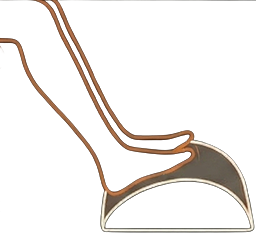
Many people prefer to keep the keyboard on top of the desk, rather than use a keyboard tray. In this case, a footrest allows the chair to be raised without compromising lower-body posture too much.
- Raise your chair until your resting elbow height is slightly higher than the top of the keys
- Support your feet so they rest comfortably and maintain a knee angle of approximately 90–110 degrees
If you select the Fixed Desk option in the calculator and enter your desk height, it will estimate the footrest height needed to fill the gap.
Keyboard Tray
A keyboard tray brings the typing surface down and allows you to:
- Maintain neutral shoulders and elbows without raising the chair
- Apply negative tilt to keep wrists in a neutral position, something a flat desk surface cannot easily achieve
Before purchasing, consider available hand and thigh clearance to ensure comfortable use. This is often the most effective solution when a fixed desk is significantly too high.
If a Fixed Desk Is Too Low
A desk that sits too low forces the user to hunch forward, which can lead to discomfort in the neck, shoulders, and upper back over time.
Raise the Surface
Raising the entire work surface to the recommended computer keyboard height encourages a more upright, neutral posture and ensures greater stability than a desk riser or converter.
This can be done by:
- Placing stable supports, such as books or riser blocks, under the legs of the desk
Frequently Asked Questions
Thanks for using the ergonomic keyboard height calculator! I tried to make this more fun and personalized than the standard tools out there. Share if it works for you. To recommend improvements or just reach me, my email is georgi@createcomfy.com

Leave a Reply