
TikTok Safe Zone Overlay
Stop guessing. Get the free PNG overlay used by pro video editors for Premiere, DaVinci, CapCut & more.
Visualize the Safe Area
This TikTok safe zone template is the essential guide for creators tired of unexpected cropping.
Preview before posting
FULL SCREEN
Vertical Tiktok
15.1kb PNG (Transparent)

Why Use a TikTok Safe Area Template?
Professional video editors trust templates for perfect videos
🎬
Preview Before Posting
See exactly how your video will look on the For You Page before you export and upload.
No surprises.
✂️
Avoid Safe Zone Issues
Ensure your important visuals stay within the TikTok content safe zone and aren’t hidden behind your username, captions, or buttons.
⚡
Speed Up Your Workflow
Edit faster knowing your framing is correct. Use this TikTok border template during the edit to catch mistakes early.
👥
Client Presentations
Demonstrate professional formatting, using the TikTok layout template.
🎯
Guaranteed Accuracy
Create content that fits the app’s current 2026 safe area layout for 99% of all devices.
💰
100% Free Forever
No watermarks. Download the TikTok overlay PNG and use it as many times as you need.
TikTok Safe Zone Guide
Understanding the editing overlay and UI ensures the focus of your content remains visible
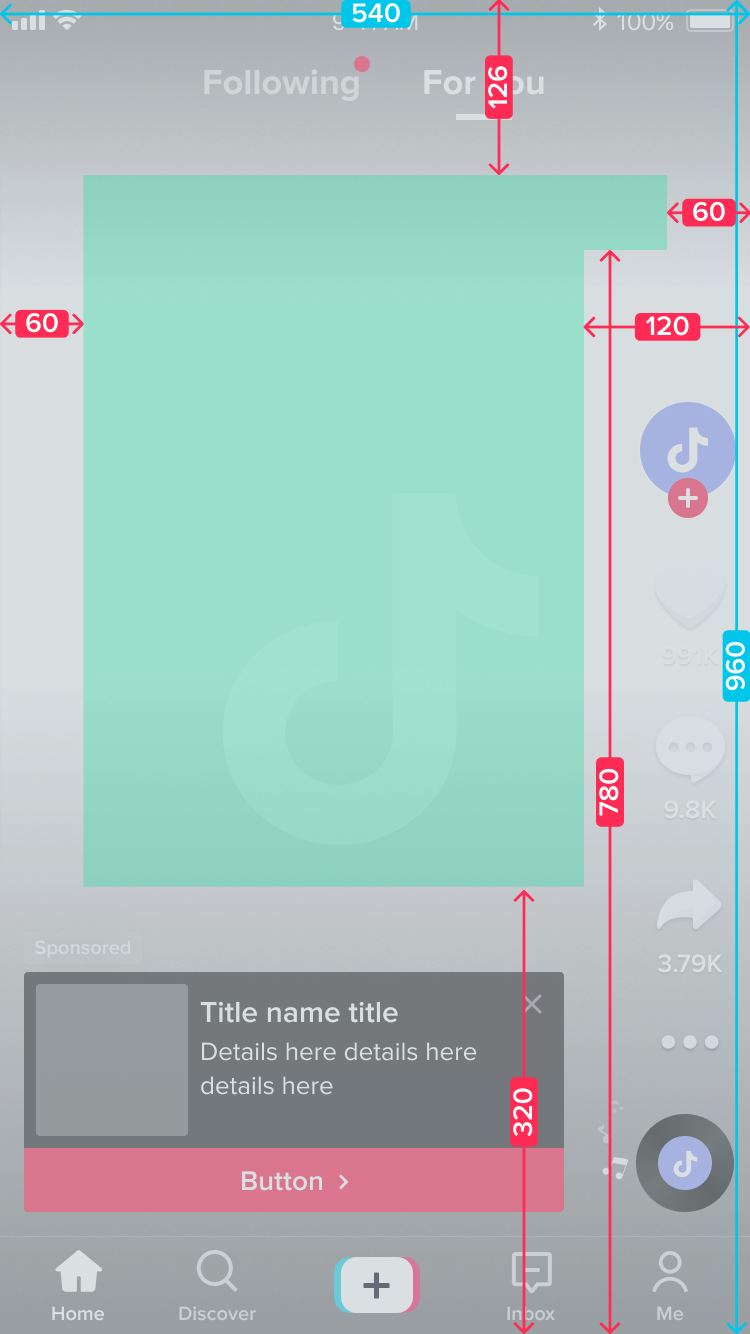
Top buffer: 13%
The “Following” and “For You” tabs, plus the Live/Search icons, occupy this area permanently. Keep heads and text out of this tiktok frame template area to prevent crowding.
This is the least critical buffer. You can reduce it slightly if needed.
Bottom buffer: 21%
Your handle, description (which expands!), hashtags, and other popups all live here. Sponsored posts with a CTA require even more space.
This buffer is important, but can be reduced somewhat, it’s good to keep it clean (and darker) to make reading easier.
Left and right buffers: 5.5%
To appear full-screen, TikTok crops the sides of 9:16 videos slightly. Keep critical elements away from the absolute edges.
The padding in this buffer is enough to cover all devices. You can safely remove 1/3 and it would still fit most modern phones.
Engagement buttons: 9%
The profile, heart, comment, bookmark, and share buttons stack vertically along the right side.
This tiktok frame overlay area is strictly off-limits for text.
Optimal safe zone: A 840px by 1264px rectangle, minus the engagement buttons overlap.
This overlay is intentionally restrictive to match official recommendations, yet highly optimized.
How to Use The Template
Step 1: Download the PNG Overlay
Step 2: Import to Your Editor
Open your video editing software (Premiere Pro, After Effects, DaVinci Resolve, Final Cut Pro, CapCut, Meta’s Edits etc.) and import the file.
Step 3: Place Over Your Video
Drag the template to the top layer above your video content. Scale it to match your resolution (1080×1920 px by default).
Step 4: Edit With Confidence
Now you can see exactly where the interface elements will appear. Keep important content inside the TikTok safe zone dimensions and edit knowing your framing is perfect!
💡 Pro Tip: Create a project template in your editing software with the overlay already in place. This saves time on every new project!