

Have you ever sat in an “ergonomic” chair but still felt back pain after an hour? Or bought a standing desk only to find your shoulders aching? The problem likely isn’t the furniture itself, but the geometry of how it is set up relative to your unique body dimensions.
This leads many to wonder: how is desk and chair height calculated correctly? Is it just a guessing game, or is there real science behind it?
The answer lies in a field called anthropometry, the scientific study of human body measurements. While many online tools rely on simple, static ratios (like “your desk should be 65% of your total height”), the most accurate tools use complex regression analysis based on trusted databases. In this article, we will pull back the curtain on how ergonomic calculators work and explain the specific formulas that determine your perfect workstation setup.
How Are Ergonomic Calculations Done?
At their core, how ergonomic calculators work is by utilizing large datasets of human body scans, such as the ANSUR II (Army Anthropometric Survey) database.
These tools use regression analysis, a statistical method that predicts specific limb lengths based on your total height. For example, if you are 175cm tall, we can predict with high accuracy the length from your floor to your knee (popliteal height) and your seat to your elbow. This is how desk height calculations are made with precision rather than using generic averages.
How Is Chair Height Calculated?
Before we can touch the desk, we have to ground the body. If your chair is wrong, everything else will be wrong. So, how is chair height calculated?
Chair Height = Popliteal Height + Shoe Heel Height
It all starts with the Popliteal Height measurement. This is the vertical distance from the floor to the crease at the back of your knee while you are seated.
Our own chair height calculator uses these formulas based on body height (h) input:
Male Popliteal (Seat) Height: P = 0.24 × h + 3.9
Female Popliteal (Seat) Height: P = 0.235 × h + 3.0
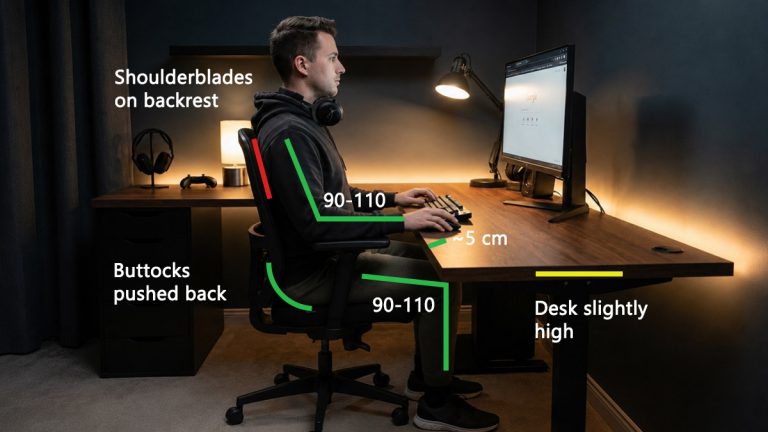
For the average person, this ensures that your feet are flat on the floor and your thighs are parallel to the ground. If the chair is too high, you cut off circulation behind the knees. If it’s too low, you force your hips into a sharp angle that strains the lower back. This measurement establishes the baseline for how ergonomic desk and chair height is calculated as a complete system.
How Is Desk Height Calculated?
Once you are seated correctly, you can determine where the desk should be. Many people assume standard desk height (29 inches) is safe, but that height is actually designed for a person who is roughly 6’2″. For the rest of us, how are desk height calculations made?
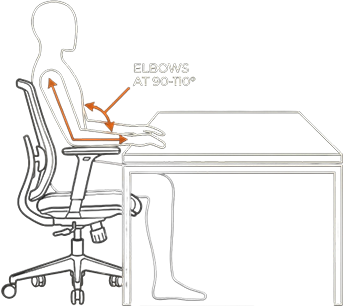
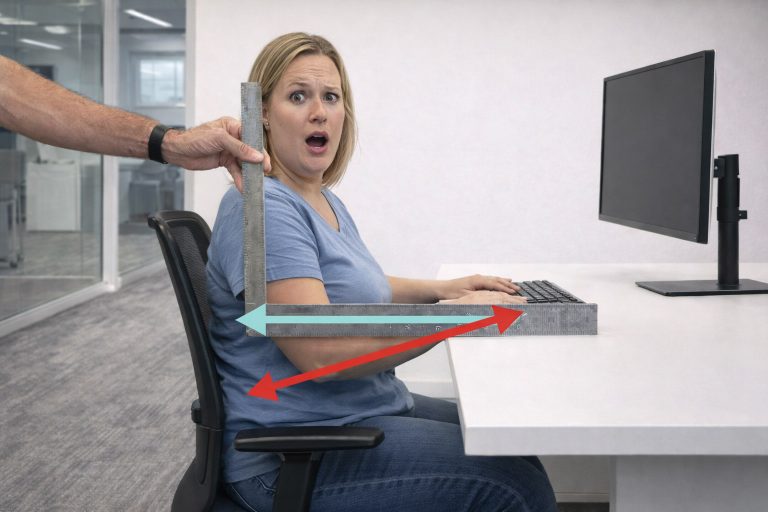
The “Elbow Rule” is the gold standard when determining ergonomic desk height. With your shoulders relaxed and your arms hanging naturally, your forearms should form a 90 to 110-degree angle with your upper arms.
We can determine this by measuring the distance from your seat to your elbow (the anthropometric ratio) and adding it to your seat height.
- The Male Ratio: The torso/arm segment is calculated as approx 0.133 × h – 0.89
- The Female Ratio: The torso/arm segment is calculated as approx 0.145 × h – 1.0
Wait, why is the female ratio higher? Because on average, women have shorter legs but longer torsos relative to their total height. A simple “percentage of height” formula fails here, how ergonomic calculators work in “Precision Mode” is by distinguishing these subtle skeletal differences.
The Standing Desk Revolution
With the rise of sit-stand desks, we have a new variable. The correct ergonomic target is your Standing Elbow Height.
According to the ANSUR II (U.S. Army Anthropometric Survey) database, the gold standard for body segment data, the average ratio of Standing Elbow Height to total Stature is approximately 0.63 (specifically 0.629 for men and 0.624 for women).
Our tool for example uses regression equations to find your Standing Elbow Height with great accuracy:
Male Standing Desk: Height ≈ (0.629 × h) + 1.6
Female Standing Desk: Height ≈ (0.624 × h) + 1.2
Why the +1.6…? Just like with the chair, these are regression intercepts. Human proportions aren’t perfectly linear. If you could theoretically shrink a person to 0 height, their elbow wouldn’t necessarily be at 0. This small constant serves as a mathematical correction, shifting the formula to align perfectly with the real-world anatomical data of the population.
This places the desk where your elbows rest when your shoulders are relaxed.
Don’t Forget the Shoes: Since these formulas are based on barefoot body measurements, our tool adds a separate calculation for Shoe Heel Height and Anti-Fatigue Mats. These can easily add 1–2 inches to your required desk height, bridging the final gap between the math and your actual standing posture.
Conclusion
So, how is ergonomic desk and chair height calculated? It is not magic; it is a series of biomechanical equations designed to neutralize the forces on your joints. By using a calculator that accounts for variables like gender, shoe height, and even eyewear, you can move beyond “feeling” and start relying on data to protect your health.
While these averages are helpful, they don’t account for people with long legs and short torsos (or vice versa). That is why manual measurement is always superior to a generic calculator.
Now that you know how are ergonomic calculations done, you can audit your own setup. Does your chair match your popliteal height? Do your elbows float comfortably above your desk? If not, it might be time to grab a tape measure (or use our calculator) to find your perfect fit.





It’s surprising how many ergonomic calculators oversimplify things with generic recommendations. The use of databases like ANSUR II really highlights the importance of personalizing your workspace for maximum comfort and efficiency.