
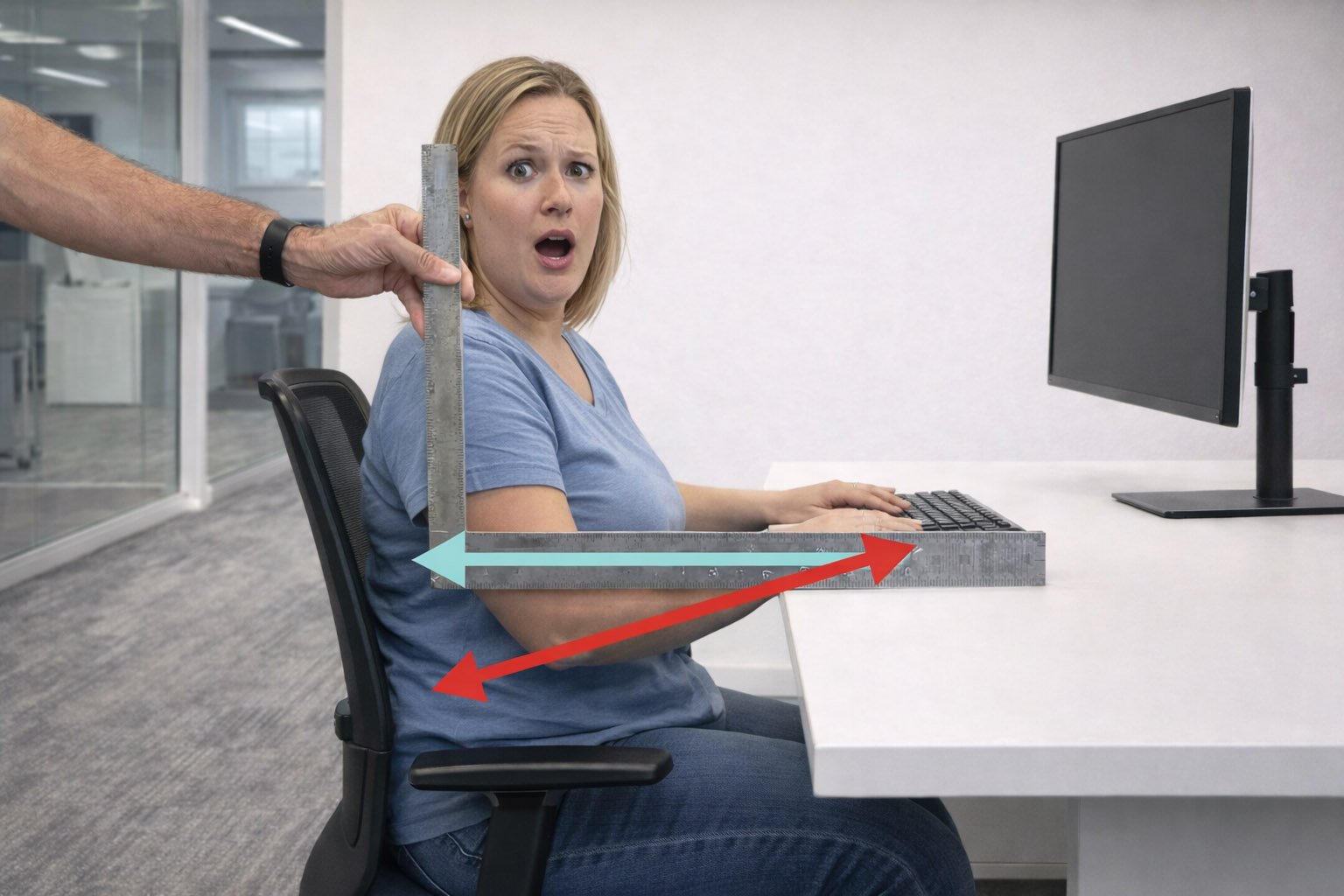
Proper keyboard height comes down to one thing: where your typing surface sits relative to your elbows. At or slightly below elbow height keeps your whole upper body relaxed and neutral.
This guide explains the ideal keyboard height, how to adjust your desk or tray, and the role keyboard thickness plays in your final setup.
What Is the Optimal Keyboard Height?
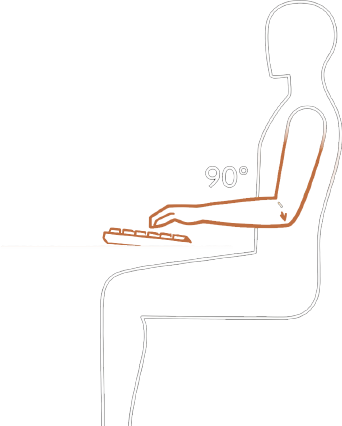
It’s a range, not a specific number. The Canadian Centre for Occupational Health and Safety recommends a 90 to 110 degree elbow bent when sitting or standing.
When properly set:
- Arms hang naturally at your sides
- Shoulders remain relaxed
- Wrists stay straight and neutral
How to Set Your Keyboard Height
1. Set Chair Height First
This determines your seated elbow height.
Sit upright with your usual footwear make sure that:
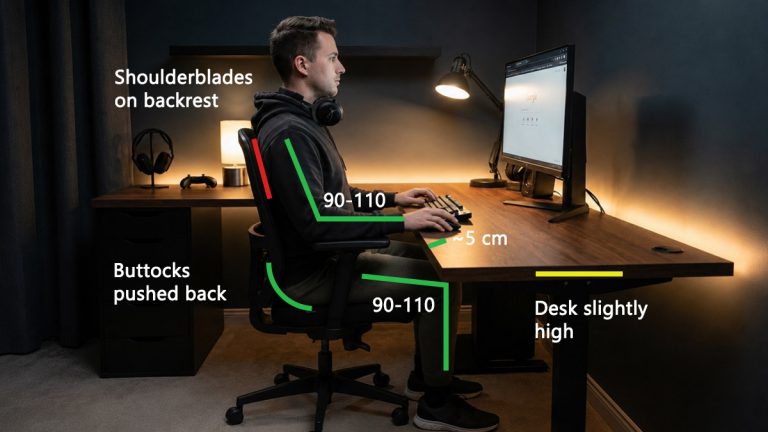
- Hips slightly higher than your knees
- Feet flat on the floor
- Knees bent about 90 to 110 degrees
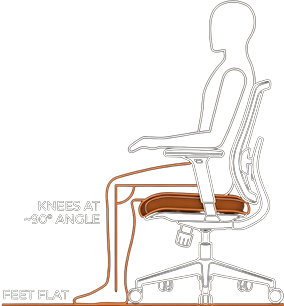
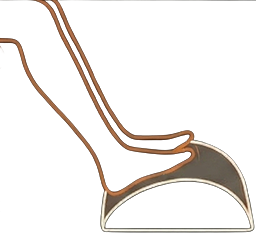
Use a footrest to reach a desk that is too high.
2. Find Your Elbow Height
Your “Elbow Height” is the vertical distance from the floor (or seat) to the bottom of your elbow.
How to measure:
- Relax your shoulders
- Sit or stand in erect posture
- Let your arms hang naturally at your sides.
- Make your forearms parallel to the floor, approx. 90-degree elbow bend.
Estimated Elbow Heights by Stature
Alternatively, use averages derived from the U.S. ANSUR II survey, which measured over 6,000 adults.
For most adults, the distance from the seat to the elbow ranges from 22 to 26 cm (approx. 9 to 10 inches).
The distance from the floor to the elbow varies significantly by height.
3. Adjust Your Desk
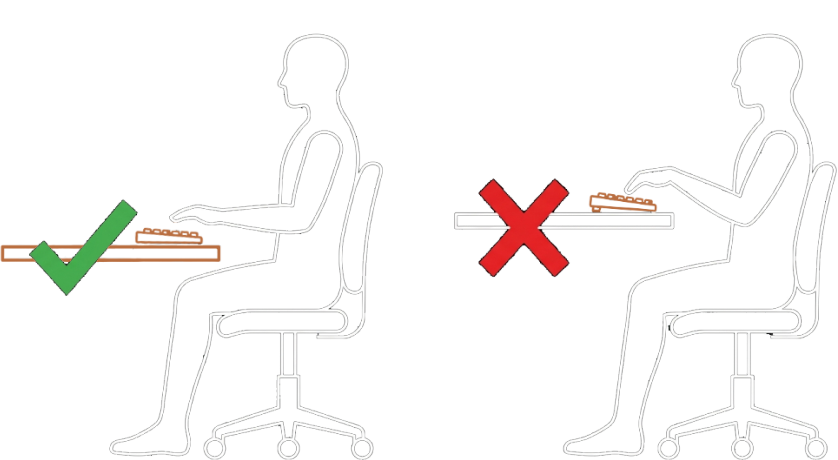
Once your posture and elbow height are established, adjust your desk or keyboard tray so the tops of the keys align with or sit slightly below that elbow height, down to a 110 degree bend.
Important: Your hands do not type on the desk. If you set the desk surface to elbow height and then place a thick keyboard on top, your wrists may be forced to bend upward.
Using a Keyboard Height Calculator
We’ve made an ergonomic tool that directly translates the advice on this page and other variables into an optimal height range for your desk. It works, but should be treated as imperfect guidelines, not magic. Always confirm comfort using posture and proper wrist and arm alignment.
Use our keyboard height calculator to get your ideal typing desk height.
You answer a few basic questions for the calculator.
- Body height
- Shoe height
- Keyboard thickness
Body height helps estimate limb proportions, shoe height affects your effective standing or seated height, and keyboard thickness determines how far above the desk your hands are.
Correct Posture for Typing
The absolute best way to set the correct keyboard height is to start with a good posture and adjust your setup around it.
For laptop users, this often means using an external keyboard or stand to separate screen and keyboard height.
Elbow Position
Your elbows should sit close to your body.
If the keyboard is too high, your arms go outward and form a triangle to compensate.
If it is too low, or far, you will lean forward and round your back.
Wrist Alignment
Your wrists should form a straight line with your forearms. They should not bend upward, downward, or sideways while typing.
Wrist extension (bending upward) is one of the most common mistakes office workers and gamers make. Even a 15-degree upward bend significantly increases pressure inside the carpal tunnel.
Fixed vs Adjustable Desks
If your desk adjusts control it so the keyboard surface comfortably aligns within a 90-110 degree bend of your elbows and save the height.
Fixed-Height Desks
Non-adjustable office desks are typically 29 inches (74 cm).
This is too tall for most people to maintain a healthy posture without using accessories.
If the desk is too high:
- Raise your chair and use a footrest, or
- Use a keyboard tray to lower the typing surface
How a Keyboard Tray Helps
A tray can solve ergonomic distance and height issues without forcing you to raise your chair, though it can restrict the space for your thighs.
The larger the distance between your elbow and the desk surface, the more useful a tray becomes. A standard 29 inch (74 cm) desk is incompatible with smaller users, but good for putting a keyboard tray underneath.
For example:
- A 5’4″ (163 cm) woman has a seated elbow height of 24–25 inches
- The desk is 4–5 inches too high
To work ergonomically, she must either:
- Raise the chair by 4 to 5 inches and use a footrest.
- Use a keyboard tray to lower the keyboard closer to elbow level.
Many people dislike the feeling of their setup being on multiple levels and there is not always enough clearance under the desk for installation. This is why a correctly sized or height-adjustable desk is the ideal solution.
Keyboard Angle
Keyboard Legs: Yes or No?
It depends. According to OSHA guidelines, if the operator sits lower in relation to the keyboard, slightly elevating the back of the keyboard may help maintain a neutral wrist. Similarly, raising the front of the keyboard may help maintain neutral wrist postures for users who type with the keyboard in a lower position.

Do not use keyboard feet if they increase bending of the wrist.
Keyboard Tray Negative Tilt
If you have an adjustable keyboard tray, you can additionally:
- Tilt the back of the keyboard downward by 7–15 degrees
- Keep the front keys slightly higher than the back
This allows the wrist to remain more neutral while your fingers reach the keys.
Keyboard Thickness
Keyboard thickness is important because of two things: setting the height, as we’ve already discussed and minimizing wrist extension.
Originally most ergonomic advice assumed a “paper-thin” work surface, but today’s keyboards are often 2–4 cm thick or more. That effectively raises the typing plane above the desk surface, forcing you to bend your wrists and lift your arms.
Many people use tall keyboards, but if optimal is what you’re going for you should get a shorter one.
Low-profile keyboards (20–22 mm thick) produce significantly less wrist extension than traditional 35–40 mm keyboards.
Thickness By Keyboard
Type | Average Thickness | Ergonomic Impact |
|---|---|---|
Traditional mechanical | 30–40 mm | Often requires a very low desk or palm rest |
Standard membrane | ~23.5 mm | Common office middle ground |
Low-profile mechanical | 17–22 mm | Reduces wrist extension by 8–10° |
Chiclet / laptop-style | <10 mm | Allows the flattest wrist angle |
How to Measure Your Own Keyboard Thickness
Use a ruler from the desk surface to the tops of the home-row keys (ASDF), not just the keyboard’s case. If the keyboard itself is angled or tilted, measure to the highest key position.
For enthusiasts, keycap profiles (such as OEM or Cherry) can also matter because they vary in height. We will be publishing a dedicated blog post specifically about keyboard thickness soon.
Key Takeaways
A properly placed computer keyboard sits at or slightly below elbow height, helping your wrists stay neutral and your shoulders relaxed. Always adjust posture first, then align the keyboard to your body, not the desk.
Avoid upward keyboard tilt, account for keyboard thickness when setting desk height, and modify fixed desks with trays or add foot support when necessary.
Finally, no ergonomic setup replaces movement. Change positions throughout the day, stand or walk regularly, and take brief activity breaks to keep muscles and joints healthy.





I’ve been using a standing desk lately, but my keyboard still feels a little off. The point about wrist extension really hit home. I’m probably bending my wrists too much. I’ll try adjusting the height more closely to my elbows.